To generate Class Rosters (PDF)
In PowerSchool Admin - Data and Reporting -> System Reports - > Class Rosters (PDF)
Meeting(s)
Select - "HR" for Homeroom
Header Format Data entry (Copy the following)
<center><B>~([courses]course_name) Class Roster 2025-2026 </B></center>

Column Titles Data entry (Copy the following)
Font: Times New Roman, 13 Pt, Bold
Roster Font
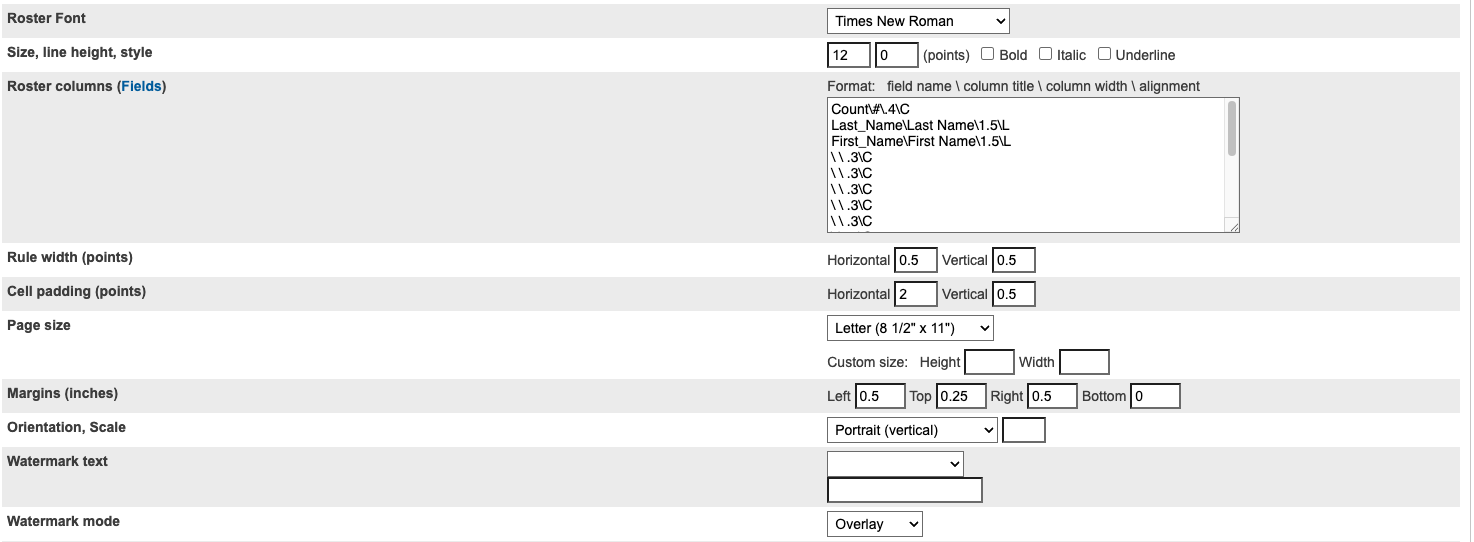
Roster Columns Data entry (Copy the following)
Count\#\.4\C
Last_Name\Last Name\1.5\L
First_Name\First Name\1.5\L
\ \ .3\C
\ \ .3\C
\ \ .3\C
\ \ .3\C
\ \ .3\C
\ \ .3\C
\ \ .3\C
\ \ .3\C
\ \ .3\C
\ \ .3\C
\ \ .3\C
\ \ .3\C
Was this article helpful?
That’s Great!
Thank you for your feedback
Sorry! We couldn't be helpful
Thank you for your feedback
Feedback sent
We appreciate your effort and will try to fix the article